About Brainrot Tower Defense
Brainrot Tower Defense sends waves of enemies down a path and asks you to stop them before they reach its end. Your tools are brainrot towers, coins, and the decisions you make about where to invest. Noobini Pizzanini is among the attackers. The names are ridiculous, but the central problem is familiar: a limited defense has to cover a route that keeps receiving more trouble.
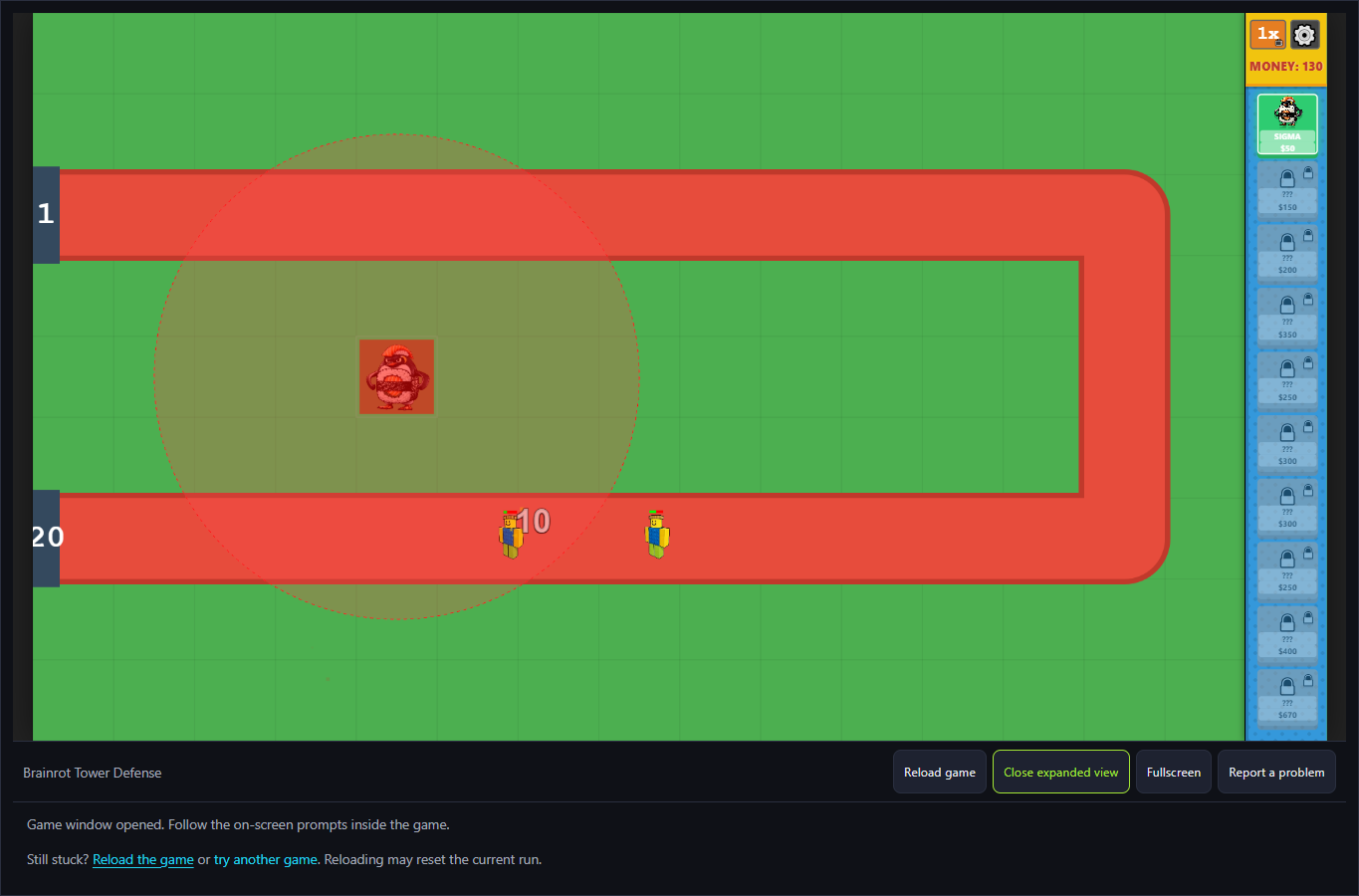
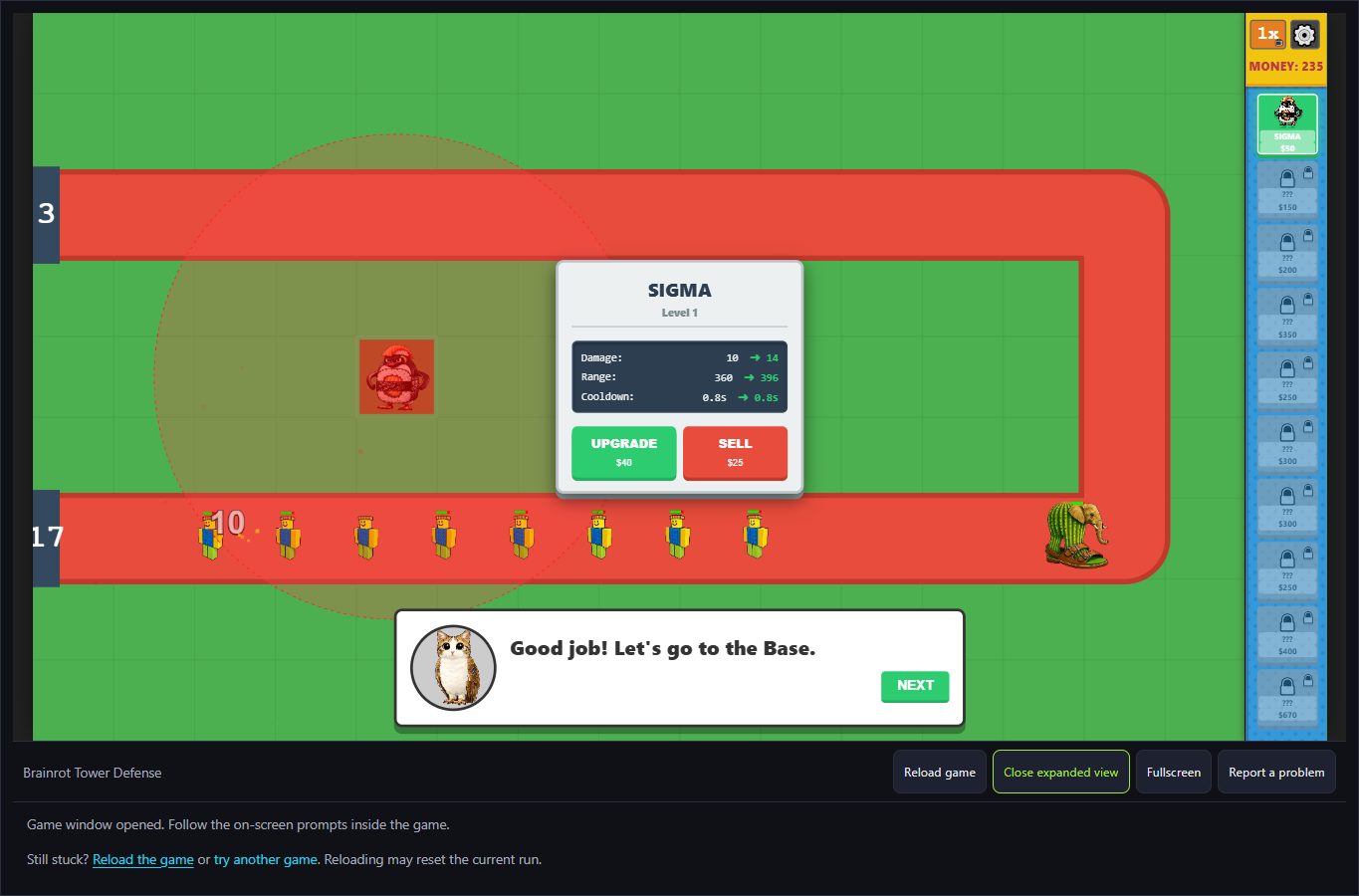
The checked opening starts with MONEY 150 and Sigma priced at $50. The other visible tower cards are locked. Placing Sigma on the highlighted tutorial square spent 50, leaving 100. Its circular range covered parts of both the upper and lower path, and actual attacks followed. Later the wave counter reached 3, but the base counter had dropped from 20 to 17: the setup advanced through waves without proving a perfect defense.
The Meme Behind Brainrot Tower Defense
The game uses the brainrot cast as both a theme and a way to make its pieces memorable. Towers are easier to talk about when you can recognize a particular face, even if you have not learned its exact name yet. The same goes for an enemy that keeps slipping through: noticing where it survives is more useful than simply deciding the whole defense is bad.
There is also a collection element beyond the path. The official description includes collecting souls from captured brainrots and using them in a Brainrot farm. Explore that system through its own displayed instructions. For your opening attempts, the clearest place to learn is still the route: understand how your towers and wave rewards work before dividing your attention among every available menu.
How to Play Brainrot Tower Defense
Choose English in the opening tutorial, continue with Next, then select Sigma from the right-hand shop. Follow the highlighted placement square. The checked purchase cost $50 and changed MONEY from 150 to 100. The tower attacked without additional firing input; a visible 10 indicator appeared over an enemy during Wave 1.
Watch the whole path, not only the tower's first hit. In this session the wave counter advanced to 3 while the base counter fell from 20 to 17. That shows why an attacking tower is not necessarily sufficient coverage. The selected tower's circle visibly intersected upper and lower stretches but left the far bend outside its reach.
Click a placed Sigma to compare the offered actions. At Level 1 the panel showed Upgrade $40 and Sell $25. The upgrade preview displayed damage 10 to 14, range 360 to 396 and cooldown 0.8s to 0.8s. Buying it advanced the panel to Level 2, which offered a further $80 upgrade. Those are displayed values for this opening tower, not a ranking of every tower.
A second Sigma card cost $50, so the observed menu gives a concrete comparison: $40 strengthens an existing position; $50 buys another placement. The better choice depends on where enemies are escaping. We did not run a controlled comparison of both setups. Video/television-labelled controls and locked-card rewards were not used for this result.
The tutorial's Next action returned to Your Base and prompted the Mystery Box. This establishes the base entry, not a completed farm or capture cycle. Follow the current menu's own costs and requirements rather than assuming the battle's money and the base's displayed currency are interchangeable.
Controls
- Mouse click: Select towers, choose placements, and use the management buttons.
- Touch input: not verified on a physical phone; follow the game prompts if your device offers touch controls.
- Tower panel: Read upgrade information and use the available management options.
- Farm interface: Follow the displayed instructions for captured souls and farm choices.
- Expand: Give the route and tower details more viewing space.
Tips & Tricks
- Read the available Sigma card and the locked cards separately. A displayed future price does not make a locked unit selectable.
- Placement cost $50 in the checked opening. Verify that the tower appears and MONEY changes before treating the placement as accepted.
- Use the range circle to inspect both straight stretches. Coverage of one early section leaves other parts of the route to consider.
- An attack indicator proves an attack, not a cleared wave. Watch the wave counter and base counter together.
- Compare the $40 Level 1 upgrade preview with a $50 additional Sigma. This is an offered-choice comparison, not a verified optimal purchase order.
An attack is not a perfect wave
The $50 tutorial placement produced a visible attack and 10 damage indicator during Wave 1. The game later advanced to Wave 3, with the base counter reduced to 17. This is a real early defense result with losses, not evidence that the opening placement clears the campaign.
Read what an upgrade actually changes
Sigma's Level 1 panel offered Upgrade $40 and Sell $25. Its displayed preview changed damage 10 to 14 and range 360 to 396, while cooldown stayed 0.8s. The accepted purchase advanced the panel to Level 2. A stronger tower and an additional tower address different problems; their mere availability does not establish which is best.
Why Play Brainrot Tower Defense Here
Brainrot Tower Defense suits players who enjoy making a plan and then watching it meet a practical test. The path gives your decisions a visible consequence: enemies either get stopped or reveal a weakness as they move through. The theme keeps the scene playful, while coins and new options give you reasons to revise your setup. A satisfying attempt is one where you can explain why the defense improved, even if the towers doing the work look completely unserious.